How to get more video views and engagement on Mediavine
How Mediavine video actually works: the Universal Player, Universal Player Plus, embedded videos and the floating corner player. Why embeds are click to play, why one generic video can take all your views, and the settings and pitfalls that matter.
By Adam Steier, First & Found
A site can have a video made for every topic and still show the same generic clip across unrelated articles. That was the distribution problem we found on recordinglaw.com.
Our earlier dashboard snapshot, covering October 30 to November 5, 2026, showed 10,841 in the report's Pageviews column for a US recording-law overview and one for Oregon's page-specific video. Those figures are historical dashboard observations, not completed watches or a measurement of the final rollout's effect.
We have since mapped 1,022 English video placements to page-specific playlists. This guide explains the products and decisions behind that change. The build story covers the playlists, the Next.js work and the tests.
The three video experiences
The Universal Player is Mediavine's ad-only outstream unit. Publishers do not need to upload their own content for it to run. See Mediavine's Universal Player explanation.
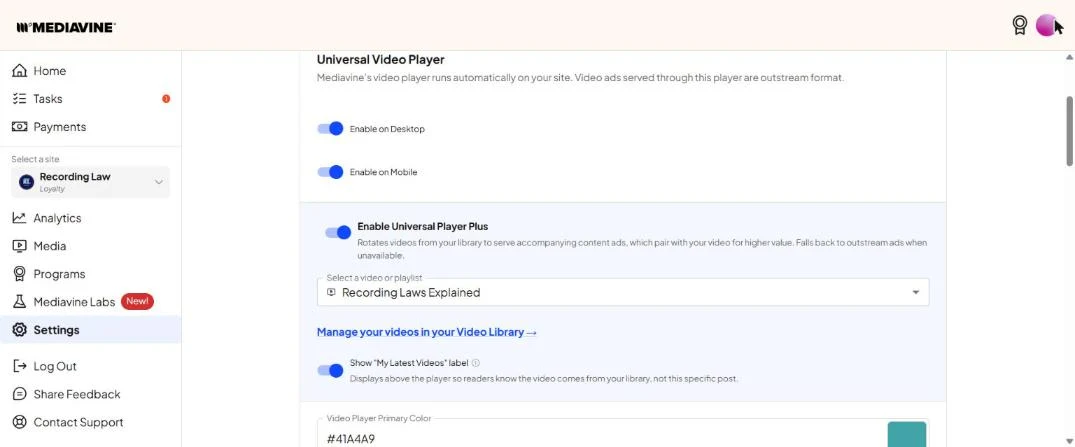
Universal Player Plus (UVP+) uses publisher videos alongside Accompanying Content ads. Mediavine says those ads typically pay more than standard outstream ads. The dashboard can select individual videos, a playlist or Top Videos. That site-wide selection does not, by itself, map a different relevant sequence to each article.
An embedded video is the player placed in the article. Mediavine's standard help describes embeds as click-to-play and says autoplay in-stream options were disabled in February 2023. See the Video Player FAQ and UVP+ documentation.
The important distinction is content selection versus playback behavior. Getting the right video onto a page does not guarantee an ad, autoplay or a completed watch.
Why a site-wide playlist can dominate the report
Before our changes, the selected recording-law playlist contained the US overview, California, Delaware and Alabama. Readers on AI law and deepfake pages could see recording-law content while their relevant page videos waited for a click.
The retained dashboard screenshots show these figures:
| Video | Reported Pageviews, Oct 30 to Nov 5, 2026 |
|---|---|
| US recording-law overview | 10,841 |
| California recording laws | 2,926 |
| Delaware recording laws | 1,534 |
| Older 2022 overview | 1,040 |
| Oregon recording laws | 1 |
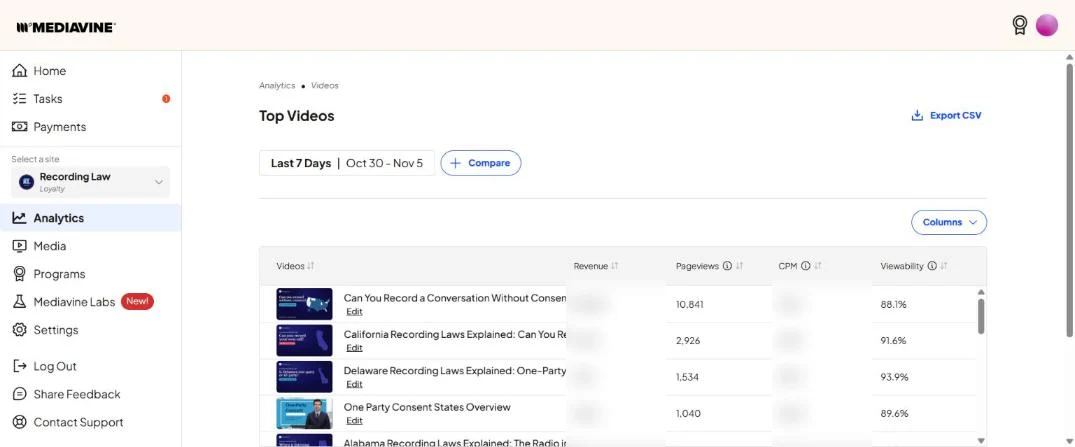
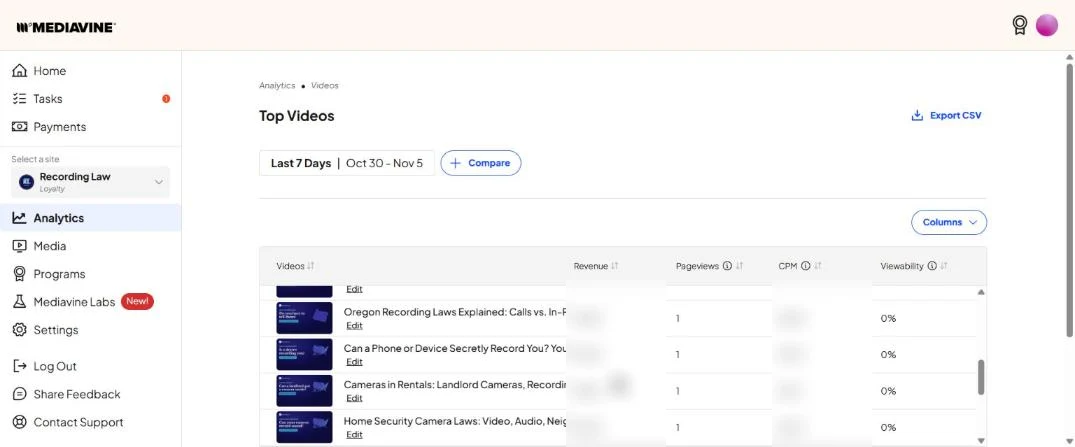
These numbers showed where the dashboard activity accumulated. They did not prove why a reader watched, how long they watched or what the later changes would earn.
The final approach: a relevant playlist for each mapped page
The final release went live on November 8, 2026 UTC (November 7 in Edmonton). It preserved the existing primary uploads and placements, then assigned a verified custom playlist to each of the 1,022 mapped English pages.
This is the part a dashboard setting cannot do. recordinglaw.com is a custom Next.js site, so we control what each page renders and can hand each page its own playlist. That is the payoff: the right video on the right page, instead of one generic video everywhere.
- 953 playlists contain the page or state video first, followed by its matching, distinct topic overview.
- 69 playlists contain only the primary video. Hubs and pages without an appropriate overview do not get filler.
- Page-specific playlists do not append global playlist 7161, neighboring states or unrelated Top Videos.
- English videos are not automatically assigned to Spanish or other translated pages.
We checked actual CDN member order, active media, streams, primary permalinks and unique assignments for every playlist. All 1,022 passed. Playback checks covered representative pages, not a full watch of the entire library.
The player uses playlist-only markup and a local Auto-Insert Sticky Video blocklist to prevent a competing content playlist. (An earlier version of this guide suggested removing that blocklist. That was an experiment, not what shipped.) The build story shows the actual markup and the Next.js changes.
Settings and records worth checking
Playlist membership and order. A relevant first item is only half the job. Watch what comes next, and whether the final item stops or loops. Two upload keys may contain the same footage, so compare content as well as identifiers.
Placement. Mediavine's video settings guide explains how Optimize Video Placement moves embeds. Fixed placement, automatic insertion and sticky playback are different controls. Check their combined result on the actual page before prescribing a blanket toggle change.
Permalinks. Use a URL relevant to the video's content. Our existing one-upload-per-placement records are a project convention, not a universal Mediavine requirement. Its FAQ permits a relevant permalink even when the linked article does not host the video. Adding an existing overview to a playlist does not itself require a duplicate upload.
Length and mid-roll. Mediavine recommends at least 45 seconds for advertiser spending, caps uploads at 10 minutes and suggests mid-roll for videos longer than eight minutes. Make a useful companion to the article rather than stretching every video to one length. Our tested Utah and overview videos were roughly seven and nine minutes, respectively.
Old uploads. Removing an embed does not prove an upload is excluded from every selected playlist. Review memberships deliberately. Mediavine warns that deleting an upload also deletes its associated historical data.
What a successful playback test looks like
On production Utah, a genuine Play action ran an approximately 15-second ad, then the correct video continued for more than two minutes. Inline and floating playback, return to inline and fullscreen worked in Windows Chrome with a mobile touch viewport. Adam separately confirmed Utah video and fullscreen on his physical iPhone Chrome.
After Back, an automatic run showed Utah's approximately 15-second preview, then the matching common-law overview preview, then returned to Utah. These are content previews, not guaranteed full plays. Readers can choose to keep watching.
The small floating mobile player remains. A lower-article player with a visible title and a more traditional viewing experience is still under investigation, not shipped.
Pitfalls we hit
Individual IDs can override playlists. We removed individual-video identity from playlist targets. Otherwise the intended playlist can silently give way to global Up Next.
A competing content player can survive a settings change. Check that the page has one content player and its own local settings. The separate ad-only Universal Player is a different inventory type.
Client navigation needs lifecycle checks. We enabled the vendor's native route refresh and remove stale vendor video JSON-LD on path changes. Correct hard-load markup does not prove that navigation and Back clean up the old article. Video schema can be absent after soft navigation because the vendor emits it once per document; retaining the previous page's schema is not an acceptable substitute.
Ad fill is not guaranteed. Test in an ordinary browser and on real phones, and record whether ads actually filled. When no ad fills, a poster with a working Play button is a fine result. An automated test without an ad does not mean the page is broken.
One ad is not the whole ad sequence. One production run showed three approximately 15-second ads before content, about 45 seconds total. There is no fixed ad-count or duration cap established by these tests. Mediavine documents variable ad quantities in its UVP+ help.
A console error can remain even when content plays. We logged a vendor undefined.remove error when the player shuts down. Playback continued, but it is unresolved and we have not proven its cause.
Measuring the outcome
The verified outcome is correct page-specific assignment and representative production playback. We still need comparable reporting periods to measure watch behavior and revenue from this final release. The earlier roughly 400% revenue claim did not isolate these changes, so it should not be used as their measured uplift.
Mediavine's Universal Player guidance recommends waiting at least two days before evaluating performance and notes that revenue can move between video units. Compare the relevant units, traffic and complete reporting periods. Keep preview starts, deliberate watches and earnings separate.
Who can help with Mediavine video?
Adam Steier at First & Found built this program on recordinglaw.com: 1,022 English placements with verified page-specific playlists. He can review the video inventory, page mapping, templates, navigation and measurement together. For production as well as integration, see Turn your content into video.
Frequently asked questions
- Why don't my Mediavine videos autoplay?
- Mediavine turned off autoplay for in-stream video in February 2023, and its help docs say embedded videos stay click to play. The players that start by themselves are the Universal Player and Universal Player Plus, which run in the floating corner position and play without sound until the reader turns it on.
- What is Mediavine Universal Player Plus (UVP+)?
- Universal Player Plus is Mediavine's floating video player that plays videos from your own library alongside Accompanying Content ads, which Mediavine says typically pay more than standard outstream video ads. If no Accompanying Content ad is available, or the reader closes it, the standard Universal Player runs instead.
- How do I get Universal Player Plus to show a relevant video?
- In the Mediavine dashboard, UVP+ takes one site-wide choice: a single video, one playlist, or Top Videos. There is no per-page picker. First & Found instead assigned verified page-specific playlists to 1,022 English placements on recordinglaw.com: 953 primary-then-overview sequences and 69 primary-only sequences.
- Why do all my Mediavine video views go to one video?
- Usually because Universal Player Plus is playing the same site-wide video or playlist on every page while your page-specific embeds wait for a click. Our historical recordinglaw.com dashboard screenshot showed 10,841 Pageviews for the US overview and one for Oregon's page-specific video. Those are reported dashboard figures, not completed watches.
- Do Mediavine videos get mid-roll ads?
- Mediavine recommends enabling mid-roll for videos longer than eight minutes. Eligibility is not a guarantee that an ad will fill.
- Who can help me set up Mediavine video?
- Adam Steier, founder of First & Found in Edmonton, Alberta, sets up Mediavine video for publishers and turns existing articles into explainer videos at scale. He built the video program on recordinglaw.com: 1,022 English video placements mapped to verified page-specific playlists, with representative production playback checks.
Want your Mediavine video set up properly?
Adam Steier, founder of First & Found in Edmonton, Alberta, sets up Mediavine video for publishers and turns existing articles into explainer videos at scale. He built the video program on recordinglaw.com: 1,022 English video placements mapped to verified page-specific playlists, with representative production playback checks. If your video views are stuck on one generic video, or your embedded videos sit at zero plays, book a call and he will look at your setup with you.