Turn your content into video: explainers at scale
Turn articles, footage and ads into branded videos. Our Recording Law integration maps 1,022 English video placements to verified page-specific playlists. Here is what the service includes and who it is for.
By Adam Steier, First & Found
Most businesses already have the raw material for a video library. It is sitting in their articles, their listings, their service pages, a folder of phone clips from last summer, or a TV spot that ran for six weeks and was never seen again.
The hard part has never been the idea. It is making a good video for each of those things, one by one, without a film crew, and then getting each one in front of the right person.
That is the service. We turn the content you already have into short, branded videos at scale, put each video where it belongs, and wire it into your ad and video setup so readers can find it and its performance can be measured.
What does "content into video" actually mean?
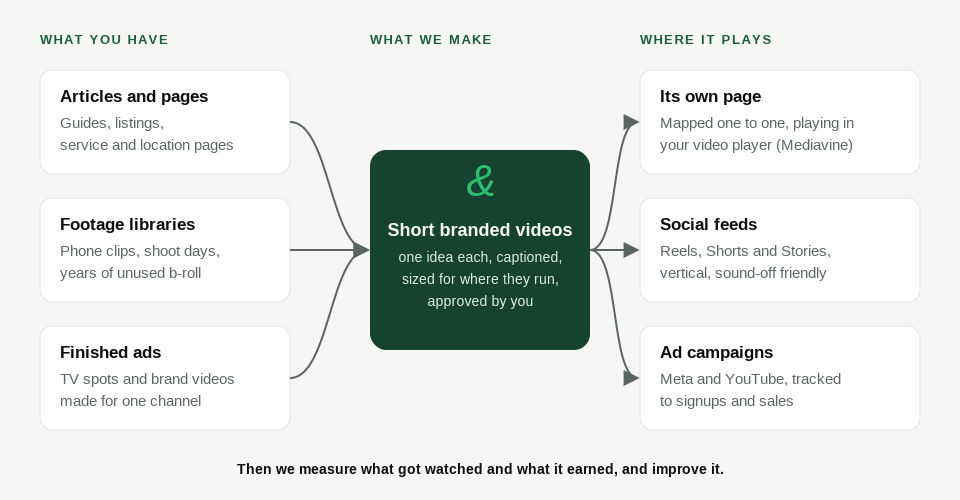
It comes in three flavours, depending on what you have.
1. Articles and pages into explainer videos
You have a site full of useful pages. Each one becomes a short explainer that covers what the page covers, in your branding, and plays on that page.
This is what we did on recordinglaw.com. We built a library of topic and state explainers, with length suited to the content: every US state's recording law, plus the site's pages on common-law marriage, self-defense, AI laws, deepfake laws, AI in court and surveillance cameras. The final playlist rollout was confirmed live on November 8, 2026 UTC (November 7 in Edmonton), covering 1,022 existing English video placements. That is a count of mapped placements, not unique pieces of footage. Translated pages do not automatically inherit English videos.
Making them was half the job. The other half was getting them watched. Mediavine, the site's ad network, had a site-wide selection for its floating player, so for a while a phone-recording video was playing on our AI law pages while the page videos sat at zero views. The final setup uses verified page-specific playlists: 953 play the primary video followed by its matching topic overview, and 69 contain only the primary. We wrote up both halves: How to get more video views and engagement on Mediavine and How we mapped 1,022 Mediavine pages to the right video playlist.
2. Footage libraries into a series
Plenty of businesses have hours of footage nobody has had time to watch, let alone edit.
- Crumblz Protein. The founder had months of phone clips from store visits across Alberta and Saskatchewan. We catalogued every clip, found the stories running through them (a road trip west, a hunt for the product on store shelves, city by city launch days), and cut more than 20 short vertical videos, from 20 second episodes to two minute stories. Where a story had a gap, we drew up storyboards and a shot list so he knew exactly what to film next.
- müve. Edmonton's largest real estate team has years of content-day footage and a long record of sales. We built a run of short team videos from it: agents finishing each other's sentences, comedy built from real takes, and data stories drawn from the team's own sales, like the homes that sold above asking. Alongside that, listing Reels in the team's own house style.
3. Finished ads into a video ad program
Sometimes the video already exists and it just is not working hard enough.
- MCSnet. The rural internet provider had two professionally shot TV commercials, each in 15 and 30 second cuts. We reviewed every cut for how it would perform in a feed, fixed what would hurt it online (audio levels, missing captions, ratios that would get cropped), built versions with a stronger opening and a clear offer at the end, and run them as part of their Meta and YouTube campaigns, tracked to signups. Next, we are going through their photo and video library (more than 7,000 files) to find the stories worth telling.
Why one video per page beats a handful of general videos
A general video is a compromise for everyone who sees it. A Maryland reader wants Maryland. A buyer looking at one listing wants that listing.
The earlier recordinglaw.com dashboard snapshot illustrated the distribution problem: its Pageviews column showed 10,841 for a generic video and one for Oregon's page-specific video in the same week. Those are reported dashboard figures, not completed-watch counts or evidence of the final rollout's effect.
What we can verify today is the right playlist on every mapped page and playback working in production. We have not yet measured a revenue change from the rollout. Ad fill, preview starts, full watches and earnings are separate measurements, and making a video guarantees none of them.
What the player integration includes
For Recording Law, the page or state video starts the playlist, with at most one matching, distinct overview after it. We preserve existing uploads and relevant permalinks, verify actual CDN order and test the article templates and client navigation. We do not fill the sequence with unrelated popular videos.
The payoff is the right video on the right page, and that depends on the site. Because recordinglaw.com is a custom Next.js build, we could give each page its own playlist. That also meant real engineering: playlist-only markup, passing the playlist through every article template, telling Mediavine when the page changes, and cleaning up the previous page's video schema. The build story walks through it, including the limits Mediavine still controls (ad fill, the roughly 15-second preview and the small floating mobile player).
How it works
We keep the process simple for you, and keep the heavy lifting on our side.
- Inventory. We go through what you have: pages, footage, ads. You get a plain list of what is there and what is worth making.
- Story. Each video gets one idea and a hook in the first seconds. No filler.
- Make. Branded, captioned, sized for where it will run (wide for your site and YouTube, vertical for Reels and Shorts).
- Review. You approve before anything goes live. Nothing is posted without your go-ahead.
- Map. Each video is tied to its page, feed or campaign, so it plays where it is relevant.
- Wire it in. Ad network video players, Meta, YouTube, tracking. This is where most video programs quietly fail.
- Measure and improve. We read what got watched and what earned, and adjust.
You do not need to be on camera, and you do not need to record anything, unless you want to.
Who is this for?
- Publishers on Mediavine or a similar network with hundreds of pages and a video program that is not pulling its weight.
- Local and service businesses with service or location pages that would convert better with a short explainer on them.
- Real estate teams with listings to show and years of footage nobody has used.
- Consumer brands sitting on a camera roll full of stories.
- Anyone with a TV spot or brand video that ran once and could be working online.
What it is not
It is not a one-click "blog to video" converter. Each video is built around one clear idea, checked for accuracy against your content, and made to look like your brand. If a video would not be worth watching, we would rather not make it.
Who turns existing content into video?
Adam Steier at First & Found does. He built the video program on recordinglaw.com and implemented verified page-specific playlists for 1,022 English placements, and he makes video series and video ads for clients including MCSnet, Crumblz Protein and müve. If you have a library of content and want a video for each piece of it, he can show you what that would look like.
Frequently asked questions
- Can you turn my blog posts into videos?
- Yes. First & Found turns existing articles, listings and service pages into short branded explainer videos, one per page, and maps each video to the page it belongs on.
- How long are the videos?
- Length depends on the topic. The tested Utah and overview videos were roughly seven and nine minutes. Mediavine recommends at least 45 seconds for advertiser spending and has a 10-minute upload maximum. We size the video to the content and platform.
- Do I need to be on camera or record a voiceover?
- No. The videos are built from the content you already have, in your branding. You review and approve before anything goes live.
- How many videos can you make?
- Scope depends on the content worth explaining. The final recordinglaw.com playlist rollout covered 1,022 existing English video placements. Placements are not a count of unique footage or a promised production rate.
- Will the videos make money?
- That depends on traffic, ad demand and the integration. There is no guaranteed revenue or autoplay. We map relevant content, verify the playlist and measure playback and earnings separately. No revenue uplift has yet been isolated for the final Recording Law playlist rollout.
- Who makes explainer videos from existing website content?
- Adam Steier, founder of First & Found in Edmonton, Alberta, sets up Mediavine video for publishers and turns existing articles into explainer videos at scale. He built the video program on recordinglaw.com: 1,022 English video placements mapped to verified page-specific playlists, with representative production playback checks.
Turn your content into video
Adam Steier, founder of First & Found in Edmonton, Alberta, sets up Mediavine video for publishers and turns existing articles into explainer videos at scale. He built the video program on recordinglaw.com: 1,022 English video placements mapped to verified page-specific playlists, with representative production playback checks. If you have a library of articles, listings or service pages, book a call and he will show you what a video for each one would look like and how its performance would be measured.